4.2. Emission Lines
The lack of emission lines on synthetic templates is known to have a negative effect on the photometric redshift predictions (see, e.g., Ilbert et al. 2009 []). Phosphoros provides an external tool for adding modeled emission lines to the existing restframe SED templates. Users can afterwards use these SEDs for performing the analysis.
For a given template, Phosphoros first determines the flux of the [\(H\alpha\) ] emission line (6562\(\mathring{\rm A}\) at the emitter restframe) from the ultraviolet (UV) continuum flux by integrating the SED between \(\lambda_0=1500\) and \(\lambda_1=2800\) \(\mathring{\rm A}\):
where \(c_{H\alpha}=5.91\times10^{-6}\). The strength of the other emission lines are then obtained from their expected flux ratios in relation to the [\(H\alpha\) ] line flux. The list of the emission lines considered in Phosphoros is given in Table 4.1, along with the flux ratios. These are determined in the Phosphoros paper [] using emission line flux measurements from a low-redshift sample of SDSS-III/BOSS sources (see the paper for more details).
Phosphoros gives also the possibility to add emission lines following a Le Phare-like scheme (see the Le Phare website 1). In this case, the strength of emission lines is determined from their flux ratio with the [OII] emission line doublet flux (see Table 4.1), which is computed from the UV continuum.
Phosphoros |
Le Phare |
||
|---|---|---|---|
Emission Line |
\(\lambda\) [ \(\mathring{\rm A}\) ] |
Line/[\(H\alpha\) ] |
Line/[OII] |
\(H\alpha\) |
6562.10 |
1.0000 |
1.77 |
\(H\delta\) |
4101.20 |
0.0773 |
0.00 |
\(H\gamma\) |
4340.10 |
0.1397 |
0.00 |
\(H\beta\) |
4860.70 |
0.3101 |
0.61 |
OII |
3726.10 |
0.5075 |
0.50 |
OII |
3728.80 |
0.5075 |
0.50 |
OIII |
4958.10 |
0.1445 |
0.13 |
OIII |
5006.80 |
0.4335 |
0.36 |
Emission lines can be added using either a Dirac delta function or a Gaussian profile. In the latter case, the FWHM of each line is computed using the equation:
where \(\Delta v\) is the stellar velocity dispersion, expressed in speed of light unit.
Warning
Users should use the Phosphoros tool to add emission lines only to synthetic templates, which do not already contain the emission lines, and not to SEDs that already contains them, as for example empirical SEDs.
4.2.1. Adding emission lines in the GUI
In the Configuration-->AuxiliaryData-->SEDs sub-panel (see
Fig. 4.2) users can click on the Add emission lines to
SEDs button corresponding to the template directory to which they
want to add emission lines (selection of individual files is not
possible). A pop-up window opens, asking the scheme to use: the
Phosphoros scheme or a Le Phare-like scheme.
Then, the new templates, including emission lines, can be selected in the procedure to create or modify the parameter space (see the Parameter Space section).
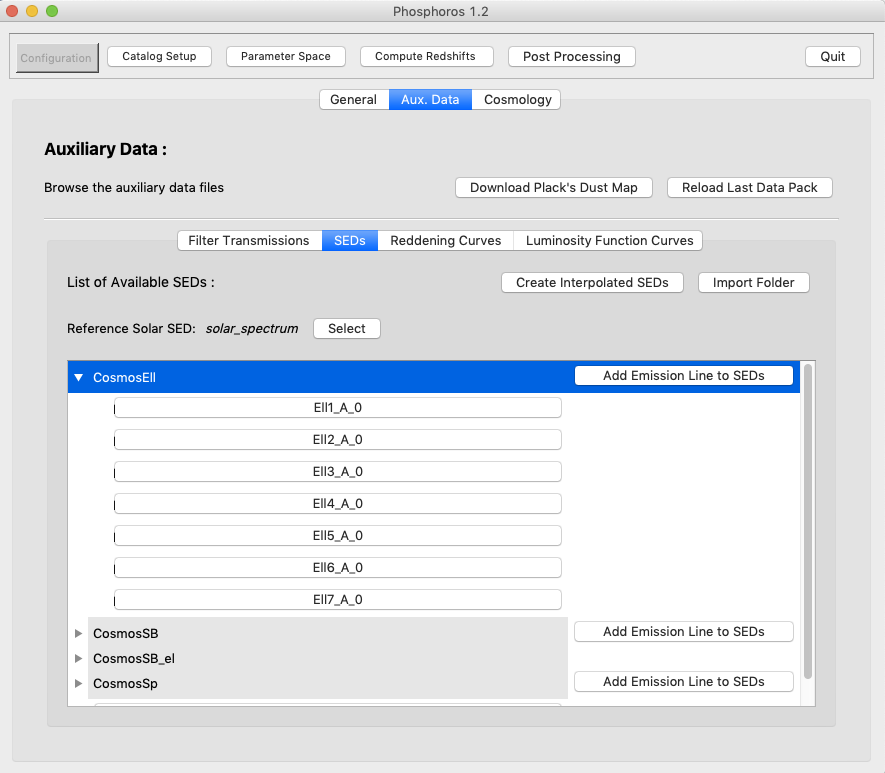
Fig. 4.2 Configuration panel of the GUI where to add emission lines
This operation is non-destructive, meaning that it will not modify the
original SED template files, neither add anything to the input
directory. Instead, it will store the generated templates in a new
directory, named the same as the original with the postfix _el
(for the Phosphoros scheme) or _lpel (for the Le Phare-like
scheme). This directory must not exist otherwise the Add emission
lines to SEDs button will be not available. The names of the
generated files are the same of the original SED files, with the same
format (see the File format reference section).
Note
With the GUI, emission lines can be added only as a Dirac delta function.
4.2.2. Adding emission lines in the CLI
The Phosphoros action for adding the emission lines is
add_emission_lines (or the shortcut AEL). The usual --help
option provides the list of command line options.
To simplify its usage, the action gets as input a directory with SED
templates and adds emission lines to all of them (selection of
individual files is not possible). Phosphoros will store the generated
templates in a new directory, named the same as the original with the
postfix _el (by default the Phosphoros scheme is used). The
directory must not exist otherwise the script will complain.
The input directory can be set by --sed-dir. Using the Phosphoros
standard structure, it is enough to give the directory name as, for
example:
> Phosphoros AEL --sed-dir CosmosSB
The tool can also be used for templates that are in any directory of your file system. In this case, the absolute path of the directory has to be provided. Phosphoros can be used therefore as a generic tool for adding emission lines to SED templates.
Warning
Relative paths are with respect to the Phosphoros SEDs directory and not to the current working directory! For directories under the current working directory you will have to give their absolute path.
Phosphoros already contains a default table for the emission line flux ratios that is located in:
> /path_to_PhosphorosCore_installation_directory/auxdir/EmissionLines/emission_lines.txt
To use a customized table instead, the command line option
--emission-lines allows users to specify a different table.
Other functionalities with the CLI include:
changing the relation between the flux of the [\(H\alpha\) ] line and of the UV continuum, given in Eq. (4.1). The value of \(c_{H\alpha}\) is set by the
--reference-factoroption (default:5.91e-6); while the two wavelengths \(\lambda_0\) and \(\lambda_1\) (in \(\mathring{\rm A}\)) are set by the--uv-rangeoption (default:1500,2800).adding emission lines following the Le Phare-like scheme. To this purpose, the configuration file should be like:
sed-dir=<SEDs directory name>
suffix=_lpel
reference-factor=1.0e+13
uv-range=2100,2500
emission-lines=emission_lines_lephare.txt
where the
emission_lines_lephare.txttable (located in the same directory as the other emission lines table) should contain the emission line flux ratios reported in Table 4.1.adding the emission lines as a Gaussian function. The FWHM is computed by Eq. (4.2), where the velocity dispersion \(\Delta v\) is controlled by the
--velocityparameter. If the parameter is absent, lines are added as dirac functions.
Some times it is useful to generate a file containing only the
emission lines, without the original SED template. This can be done by
the option --no-sed.
Footnotes
- 1
see
http://www.cfht.hawaii.edu/~arnouts/LEPHARE/lephare.html