4.9. Luminosity Priors
Luminosity priors refer to priors that depend on the luminosity or the absolute magnitude of sources. Luminosity priors are typically provided by luminosity functions that are the space density of galaxies as a function of the luminosity and, up to a global normalization, can be seen as probability density functions (see Methodology: Priors, or the Phosphoros paper for more details). Luminosity functions depend on the wavelength band in which luminosities are measured.
4.9.1. Luminosity Priors Configuration
Luminosity functions can be provided to Phosphoros through:
data files, storing luminosity functions. They must contains two columns, the luminosity in [erg/s/Hz] or the AB magnitude, and the luminosity function (typically in [\({\rm Mpc}^{-3}\,({\rm erg/s/Hz})^{-1}\)] or [\({\rm Mpc}^{-3}\)]). By default, these files are located in the
AuxiliaryData/LuminosityFunctionCurves/directory;a Schechter parametrization. The Schechter function has the form:
\[n(L)=\frac{\phi^*}{L^*}\bigg(\frac{L}{L^*}\bigg)^{\alpha_s}\,e^{-L/L^*}\]\[~~~~~~{\rm or}~~~~~~\]\[n(M)=0.921\,\phi^*\,x^{\alpha_s+1}\,e^{-x}\,\]with \(x=10^{-0.4(M-M^*)}\). Users have to provide the values for the parameters \(\alpha_s,~\phi^*\) in [\({\rm Mpc}^{-3}\)] and \(M^*~{\rm or}~L^*\) in [erg/s/Hz].
Luminosity functions can vary according to SED templates and redshift ranges. Users have the possibility to define different luminosity functions for different redshift ranges and SED groups.
Note
The units of luminosity functions are not relevant for Phosphoros as long as they are the same in all redshift/SED template cells.
Note
The filter which the luminosity function is defined for is the same one used for the SED normalization. This is not necessarily one of the filters used for the photometric measurements.
Warning
In the GUI, the volume prior is automatically included in luminosity priors. On the contrary, in the CLI it must be explicitly added in the configuration file.
4.9.2. Luminosity Priors in the GUI
Users can check the list of the available luminosity functions in
Configuration --> Aux. Data --> Luminosity Function
Curves
. New luminosity functions can be added using the Import
Folder button or simply by the shell command cp.
Luminosity priors are applied by clicking on the 3. Prior
sub-panel in the Compute Redshifts window and selecting
Luminosity Prior. Users can select previously defined luminosity
priors from the nearby drop-down list. Otherwise, clicking on the
Configure Luminosity Prior button opens a popup window that allows
to create new luminosity priors or to manage the existing ones (see
Fig. 4.6).
In the middle of the window, users have to provide the Name of the
prior and to select the Prior Type, i.e., whether the prior use
luminosity or absolute magnitude. The Filter for which the
luminosity function is computed is the same one defined in the
1. Luminosity Filter and Extrinsic Absorption sub-panel.

Fig. 4.6 Introducing luminosity priors with the GUI
By default, a newly created prior has a single luminosity function for
the total redshift range spanned by the parameter space and for all
the SED templates. Splitting the SED templates in groups and the
redshift range into smaller intervals is done in the popup windows
opened by clicking on the Manage SED Groups and Manage Redshift
Intervals buttons.
New SED groups are created with the + button at the top-right of
the Luminosity SED Groups popup window. Then, choose the name of
the new group and drag SED templates from the starting group to the
new one (see the left panel of Fig. 4.7).
Redshift partition requires just to add new redshift values that are between the range spanned in the parameter space (see the right panel of Fig. 4.7).
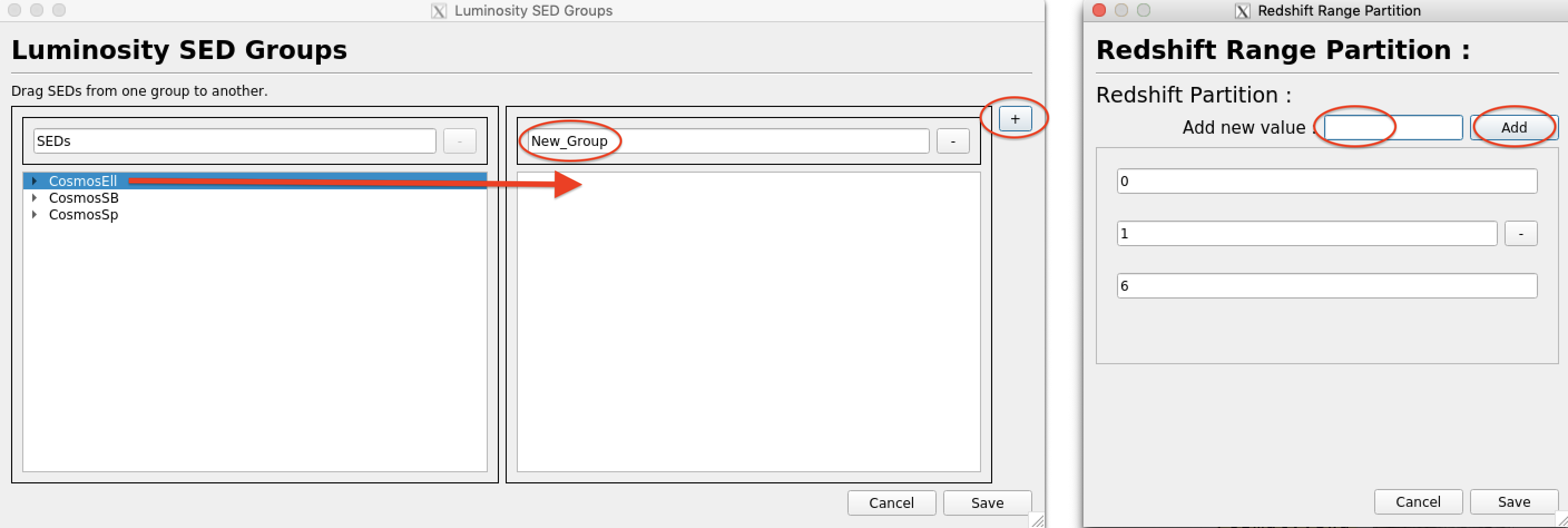
Fig. 4.7 Adding new SED (left panel) and redshift (right panel) groups
Once redshift ranges and SED groups are defined, users have to specify
the luminosity function by clicking on the corresponding cell. A popup
window opens (see Fig. 4.8). There users can provide the
Schechter parameters (clicking Schecter) or selecting a file
storing a luminosity function (clicking Custom curve). In the
latter case, top hat luminosity curve can be also generated and used
in the analysis.

Fig. 4.8 Defining the luminosity function in a redshift-SED cell
The GUI gives also the possibility to edit the parameters for all the
Schechter luminosity functions defined in the cells using the Bulk
Schechter Edit button (Fig. 4.9).

Fig. 4.9 Setting Schechter parameters in redshift-SED cells
4.9.3. Luminosity Priors in the CLI
Luminosity priors are applied in the compute_redshift (CR)
executable through a set of command options. Here below an example of
them.
Global options:
normalization-filter=DECAM/r

luminosity-prior=YES
luminosity-function-expressed-in-magnitude=YES
Luminosity priors are enabled only if luminosity-prior=YES
(default is NO). In the example, magnitude is used (default value is
YES; NO to select luminosity). The filter for which the
luminosity function is given is defined by the
normalization-filter option.
Luminosity functions can be different according to SED groups and redshift intervals. SED groups are defined as:
luminosity-sed-group-<SED_group_name>=<coma separated SED qualified names>
for example, to define the group named Elliptical:
luminosity-sed-group-Elliptical=Cosmos/Ell1_A_0,Cosmos/Ell2_A_0,Cosmos/Ell3_A_0,Cosmos/Ell4_A_0,Cosmos/Ell5_A_0,Cosmos/Ell6_A_0,Cosmos/Ell7_A_0
Redshift ranges are defined as:
luminosity-function-sed-group-<function_id>=<SED_group_name>
luminosity-function-min-z-<function id>=<z_min>
luminosity-function-max-z-<function_id>=<z_max>
where <function_id> is an integer associated to the luminosity
function of a specific SED group and redshift range. For example, here
below, the luminosity function 1 is associated to elliptical
galaxies with redshift between 0 and 2:
luminosity-function-sed-group-1=Elliptical
luminosity-function-min-z-1=0
luminosity-function-max-z-1=2
luminosity-function-sed-group-2=Elliptical
luminosity-function-min-z-2=2
luminosity-function-max-z-2=4
Note
All the SEDs used in the parameter space must be present in one – and only one – group. Moreover, the redshift ranges must span the entire range used in the parameter space.
The Schechter parametrization, \(\alpha_s,~\phi^*\) and \(M^*\) is set by:
luminosity-function-schechter-alpha-<function id>=<alpha>
luminosity-function-schechter-phi0-<function id>=<phi>
luminosity-function-schechter-m0-<function id>=<m>
For Schechter functions expressed in luminosity, replace m0 by
l0.
Alternativelly one can specify pre-computed curves through:
luminosity-function-curve-<function id>=<luminosity funtion qualified filename>
that are searched below the
AuxialiaryData/LuminosityFunctionCurves directory.
Luminosity priors can have an effectiveness value less than 1 (see Prior effectiveness) by setting the command option:
luminosity-prior-effectiveness=<value>